
Diamond inventory software
Loose polished diamonds, certificate by certificate.
What does Avirat’s diamond software do?
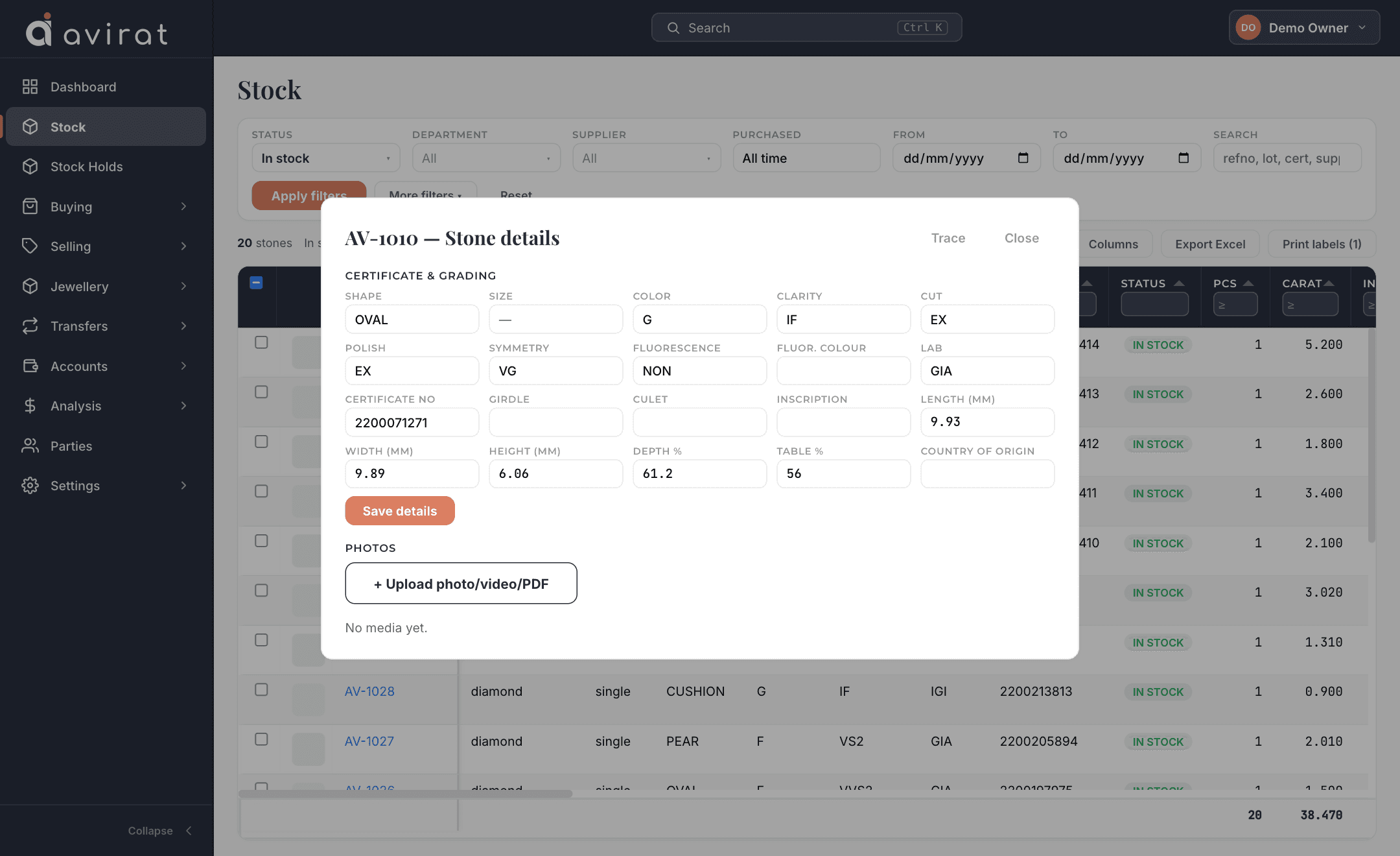
Avirat’s diamond software keeps every loose diamond as its own record — shape, carat, colour, clarity and the full GIA or IGI certificate detail (cut, polish, symmetry, fluorescence, measurements, depth %, table %, girdle, culet, inscription) — and runs the trading around it: purchase, sale, memo out and memo in, holds, branch transfers, labels and data feeds.
What you get for diamond
Full certificate detail
GIA, IGI or any lab: cut, polish, symmetry, fluorescence, girdle, culet, measurements, depth %, table % and inscription — typed in at purchase, or added later when the certificate arrives.
Stock that answers instantly
Search and filter by shape, colour, clarity, lab, grades and measurement ranges; choose your own columns; group, total and export to Excel.
Purchase, sale and returns
Enter a whole parcel in one grid or import it from Excel, then print or email the invoice with the PDF attached.
Memo out and in
Send stones on memo, take them back or sell them in part, with ageing so nothing sits forgotten.
Holds, transfers and packets
Hold stones for a customer, move stock between branches, split and merge packets.
Labels and data feeds
Barcode or QR labels sized for your own printer, and a secure feed that gives your stock to outside platforms.
Details recorded for every diamond
- Shape, carat, colour, clarity
- The four basics, from your own lists.
- Cut, polish, symmetry
- Grades as on the certificate.
- Fluorescence
- Intensity and colour.
- Lab and certificate number
- GIA, IGI, HRD or any lab.
- Measurements
- Length × width × height in mm.
- Depth % and table %
- Proportions from the report.
- Girdle, culet, inscription
- Including the laser inscription.
- Rap price and discount
- Rate worked out from Rap and discount.
- Cost and selling rate
- Kept apart, so margin is real.
- Photos, videos, PDFs
- Attached to the stone.
- Kapan / lot and country of origin
- For manufacturers.
- Your own fields
- Add any column you need.
Accounts, reports and the rest
Parties and accounts
Customers, suppliers and brokers with full details, payments, credit and debit notes, ledger and outstanding.
Multi-branch, multi-currency
Work across branches and currencies; a branch user sees only their own branch.
Users and permissions
Roles for sale, purchase, memo and accounts staff, with per-person overrides, and optional two-factor sign-in.
Print, PDF and email
Four invoice looks you can edit, a PDF for every document, and one click to email it with the PDF attached.
Reports
Margin, stock ageing, memo ageing and client reports, all exportable to Excel.
Import and export
Bring parties and stock in from Excel; take all of your data out whenever you like.
Make it yours
Add your own fields, rename, hide and reorder what is on each entry screen, and arrange every stock and report grid your way.
A full audit trail
Who changed what, and when — for every stone and document.
Deal in more than diamond? Add gemstone or jewellery to the same account — one system, one price that follows what you choose.
Diamond software — questions & answers
Can I record GIA and IGI certificate details?
Does it handle parcels as well as single stones?
Can I share my stock with other platforms?
Can I print barcode or QR labels?
Try Avirat for diamond
14 days free, everything switched on, no card needed.