
How to
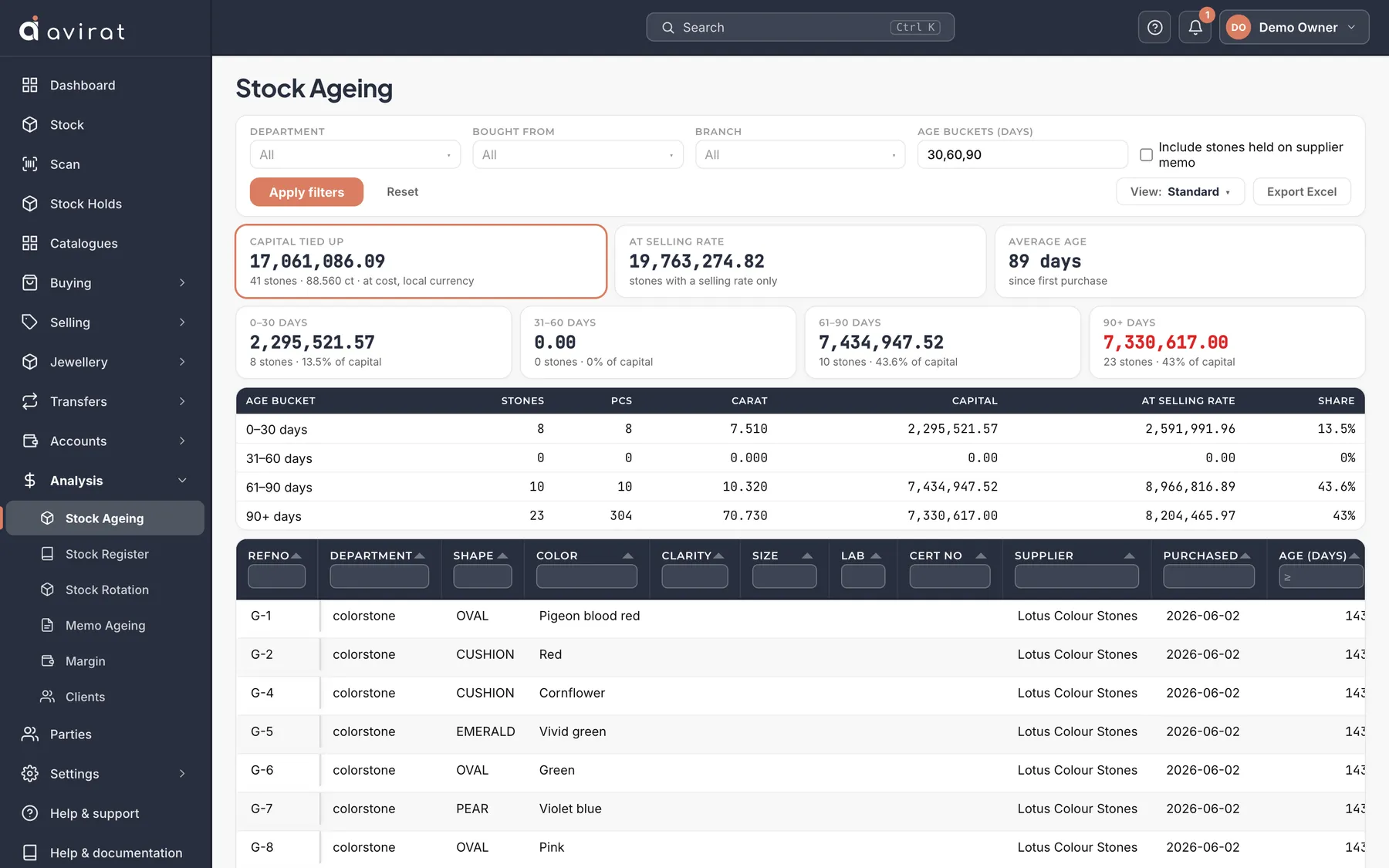
- Open Analysis → Stock Ageing. It shows your own stock, on the shelf and out on memo, aged by the days since each stone was first bought.
- Narrow it with Department, Bought from and Branch. Age buckets (days) sets the groups — 30,60,90 means up to 30 days, 31–60, 61–90 and over 90. Press Apply filters.
- The cards at the top show Capital tied up (what the stones cost you), At selling rate and the Average age. Each bucket has its own card.
- Click a bucket card to see only its stones in the grid below. Click it again, or Capital tied up, to see them all.
- Export Excel downloads the stones with the columns in the order you have them.
Good to know
- The oldest bucket is shown in red when it holds stock — those stones are where to start.
- Tick Include stones held on supplier memo to see memo-in stones too. They are not yours until you buy them, so they are left out unless you ask.
- Capital and At selling rate are shown only to people allowed to see cost and selling prices. Others see the number of stones and carats.
- Keep a layout you use often with View → Save this layout as a new view.
Related
- Stock rotation: how fast your stock turns
- Finding, filtering and exporting your stock
- Memo ageing: what is out on memo, and for how long
Still stuck? WhatsApp or call us on +91 97262 88072, or use Help & support inside Avirat — we’ll see the screen you’re on.