
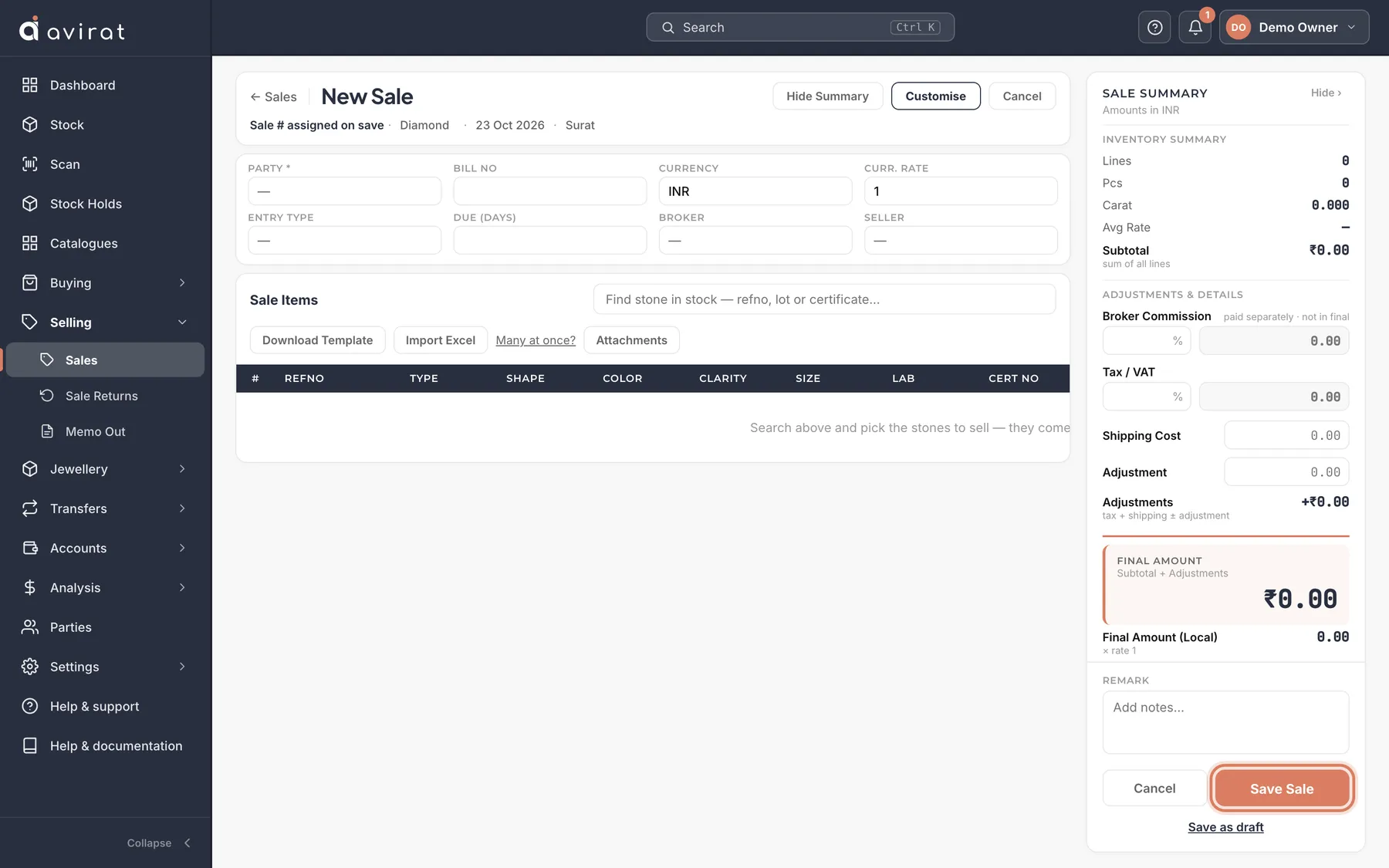
How to
- Selling → Sales → + New Sale. Choose the Party (customer) and Currency.
- In Find stone in stock, type a refno, lot or certificate number and press Enter — the stone is added as a line, with its selling rate filled in the sale’s currency.
- Check the Rate (per carat) on each line; Amount is worked out.
- Press Save Sale. The stones leave stock and the customer owes the amount. Print or email the invoice from the sale.
Good to know
- A stone on memo or on hold can’t be sold until it comes back or the hold is released — Avirat refuses it, so nothing is sold twice.
- To sell what a customer holds on memo, open the memo and press Sell to customer.
- Not finished? Save as draft keeps the form — no stone leaves stock and no number is taken.
- A customer past their overdue limit can’t be sold to until they pay, unless someone allowed to ticks Sell anyway (the Owner is told).
- The margin on every line is worked out from what the stones cost you — see Analysis → Margin.
Related
- When a customer returns stones
- Sending stones on memo — and getting them back or sold
- Receipts, payments and credit notes
Still stuck? WhatsApp or call us on +91 97262 88072, or use Help & support inside Avirat — we’ll see the screen you’re on.